

DB에서 집합은 중학교때 배우던 것과 크게 다른 것이 없다.
합집합, 차집합, 교집합의 개념 역시 똑같기 때문에 그때 그시절을 복기하며 쿼리를 짜다보면 어렵지 않다.
먼저 집합을 만들어준다.
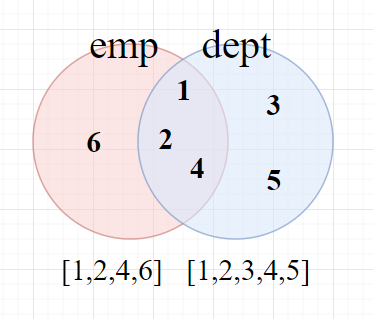
임의의 집합 dept와 emp를 만들었다. 이 집합들 속에는 숫자가 들어있으며,
집합을 테이블이라고 가정했을 때, MariaDB에서는 이 집합들을 어떻게 표현하는지 정리해보겠다.
1. Union(합집합, 중복 제거) : [1,2,3,4,5,6]
최소한 공통되는 컬럼이 하나는 있어야 사용할 수 있다. full join 하는 효과를 낼 수 있다.
중복 확인을 위해 전체 검색 후 정렬하여 검사를 수행하기 때문에 성능에 좋지 않다.
쿼리로 작성했을 경우 아래와 같다.
|
1
2
3
|
select deptno from dept
union
select deptno from emp;
|
cs |
2. Union All(합집합, 중복 제거 X) : [1,2,4,6,1,2,3,4,5]
union all 은 중복제거를 하지 않은 합집합이다. 기존 union 쿼리문에서 all만 추가해주면 된다.
|
1
2
3
|
select deptno from dept
union all
select deptno from emp;
|
cs |
3. Intersect(교집합) : [1,2,4]
intersect 역시 union all 대신 intersect를 넣으면 된다.
|
1
2
3
|
select deptno from dept
intersect
select deptno from emp;
|
cs |
3. Not In(차집합) : [3,5] or [6]
차집합은 select distinct를 사용해서 중복제거를 하거나,
not in을 사용해서 emp에서 dept를 빼는 경우, dept에서 emp를 빼는 경우를 만들 수 있다.
|
1
2
3
4
5
6
7
8
9
|
select deptno from dept; -- 1,2,3,4,5
select distinct deptno from emp; -- 1,2,4,6
-- emp 에서 dept 를 뺄 경우
select deptno from emp where deptno not in (select deptno from dept);
-- dept 에서 emp 를 뺄 경우
select deptno from dept where deptno not in (select deptno from emp);
|
cs |
MariaDB에서는 full join을 사용할 수 없는데,
union all과 select distinct를 사용하면 full join과 같은 효과를 내는 쿼리를 짤 수 있다.
|
1
2
3
4
5
6
7
8
9
10
11
12
|
-- dept 와 emp 의 합집합을 구한다.
select deptno from dept
union all
select deptno from emp;
-- 이 데이터를 하나의 테이블로 삼아 deptno 의 중복을 제거한다.
select distinct u.deptno from (
select deptno from dept
union all
select deptno from emp order by deptno
)u;
|
cs |
union all 을 통해 만든 합집합 부분을 u라고 별칭을 지어주고, select distinct를 이용해서 u.deptno의 중복되는 부분을 없애주면, full join과 같은 효과를 낼 수 있다.
'Database' 카테고리의 다른 글
| 함수(1) (0) | 2022.05.02 |
|---|---|
| Join(조인) (0) | 2022.04.28 |
| 서브 쿼리(Sub Query) (6) | 2022.04.27 |
| 참조제약 조건과 연계 참조 무결성 제약조건 (0) | 2022.04.26 |
| 제약조건 (0) | 2022.04.26 |


